Preface
I recently finished watching the TV series version of "The Three-Body Problem" directed by Yang, and gained an astonishing new understanding of the impact of human actions on the world. Although it is a science fiction drama, its revelation of human nature is very profound. A long time ago, I came across a question and answer on Zhihu. The title was probably "If someone blows up all the storage servers of Alipay, will everyone lose all their money in Alipay?" ", I am ashamed to say that from that article, the author first fully understood "how to use various means to physically destroy service clusters", and then understood "how financial system designers carefully design a security system to protect data."
And when I accidentally accessed root-servers while checking a piece of information, I thought of the problem in the title. With this question in mind, I decided to go back...
1. Understanding DNS
Before answering this question, in the spirit of inquiring, we first need to understand the working principle of DNS and the management mechanism of the root domain name.
1.1 What is DNS
Is familiar with TCP/IP protocol available, and the network layer defines IP (Internet Protocol) to Transfer data from one device to another. Based on this idea, the IP address concept was designed to number the device. For the IPv4 protocol, the IP address has a total of 32 bits and is divided into four segments (for example, 192.168.100.1), each segment is 8 bits. Details such as the classification of IP addresses and IP addressing will not be discussed in this article.
And IP is for computer equipment, which is not easy for humans to recognize and remember. So humans invented domain names, so that we can remember easier-to-remember formatted strings such as baidu.com and taobao.com. The computer equipment only knows IP. At this time, a service is needed to help convert, which is DNS. Wikipedia The explanation of DNS is: Domain Name System (English: Domain Name System, abbreviation: DNS) is a service of the Internet. As a distributed database that maps domain names and IP addresses to each other, it can make people access the Internet more conveniently. DNS uses TCP and UDP port 53. In short, it is Convert domain names recognized by humans into services corresponding to IP.
1.2 DNS architecture
DNS domain names are divided into labels by dots, as in www.smallfan.top. Each dot marks a boundary between levels. The farther a label appears to the right, the higher it is in the hierarchy. A fully qualified domain name actually ends with a trailing dot, as in www.smallfan.top.; that final dot represents the DNS root.
That is, the . root domain is at the top level, and the next level is the .top top-level domain, and the next level is smallfan.top.
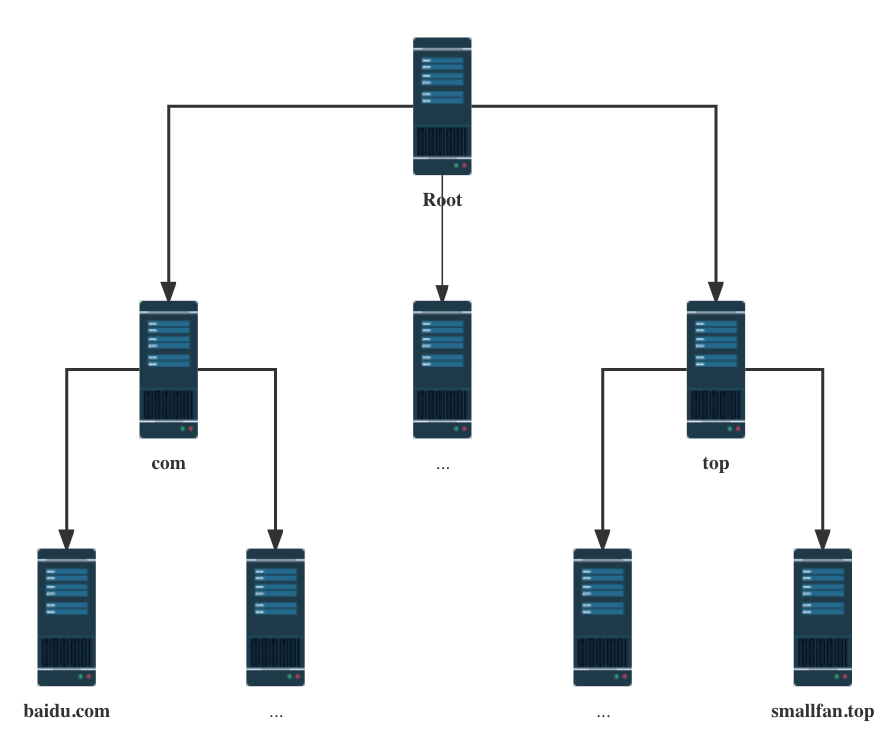
The hierarchical relationship of the domain names in the figure is similar to a tree structure:
- Root DNS Servers (.)
- Top-level domain DNS server (.top)
- Authoritative DNS server (smallfan.top)
Note: root DNS server information is stored in all DNS servers on the Internet. Therefore, as long as the client can find any DNS server, it can find Root DNS Servers through it.
2. Root DNS Servers
Next, start from top to bottom, starting from Root DNS Servers and find out step by step.
2.1 The 13 Root DNS Servers
So far, there are a total of 13 Root DNS Servers in the world, 10 of which are in the United States, 1 each in the United Kingdom and Sweden, and 1 in Japan. The named.root file can be viewed through the ICANN official website.
1 | . 3600000 NS A.ROOT-SERVERS.NET. |
You can see that there are 13 root names and IPs in it, and their names range from A.ROOT-SERVERS.NET. to M.ROOT-SERVERS.NET. .
A, referred to as root A, is Taproot, and the other 12 (B, C, D, E, F, G, H, I, J, K, L, M) are auxiliary root.
Carefully discovered that these servers themselves are also identified by domain names (such as A.ROOT-SERVERS.NET.), so they have to query the servers they point to, which can easily cause loop queries.
Therefore, Root DNS also provides the IP addresses (IPv4 and IPv6) of these servers.
1 | A.ROOT-SERVERS.NET. 3600000 A 198.41.0.4 |
Question: Why are there 13 Root DNS Servers, not 12 or 14?
Because the earlier DNS query resulted in a 512-byte UDP packet. This package can accommodate up to 13 server addresses, so there are 13 root domain name servers in the world, numbered from A.ROOT-SERVERS.NET. to M.ROOT-SERVERS.NET. .
The main consideration for controlling DNS query requests within 512 bytes is that this size can be used almost unimpeded on the Internet and will not cause IP fragmentation because the content exceeds the MTU (the maximum length of a network packet, which is generally 1500 bytes in Ethernet), thereby preventing various unpredictable consequences.
DNS mainly contains the following data:
- DNS header
- The name of the root
- TTL
- IPv4
- IPv6
- Other verification parameters
The root server set could not grow arbitrarily large, and 13 was a practical choice. For more detail, see Why There Are Only 13 DNS Root Name Servers.
Question: Are there really only 13 servers?
It is completely different from what many people imagine. These 13 Root DNS Servers are not just 13 physical servers. These 13 roots are just a logical concept. Behind each root DNS, there are multiple real physical servers working!
As of February 15, 2023, there are 1, 636 root servers running around the world. Each root has several mirrors, distributed in different places around the world.
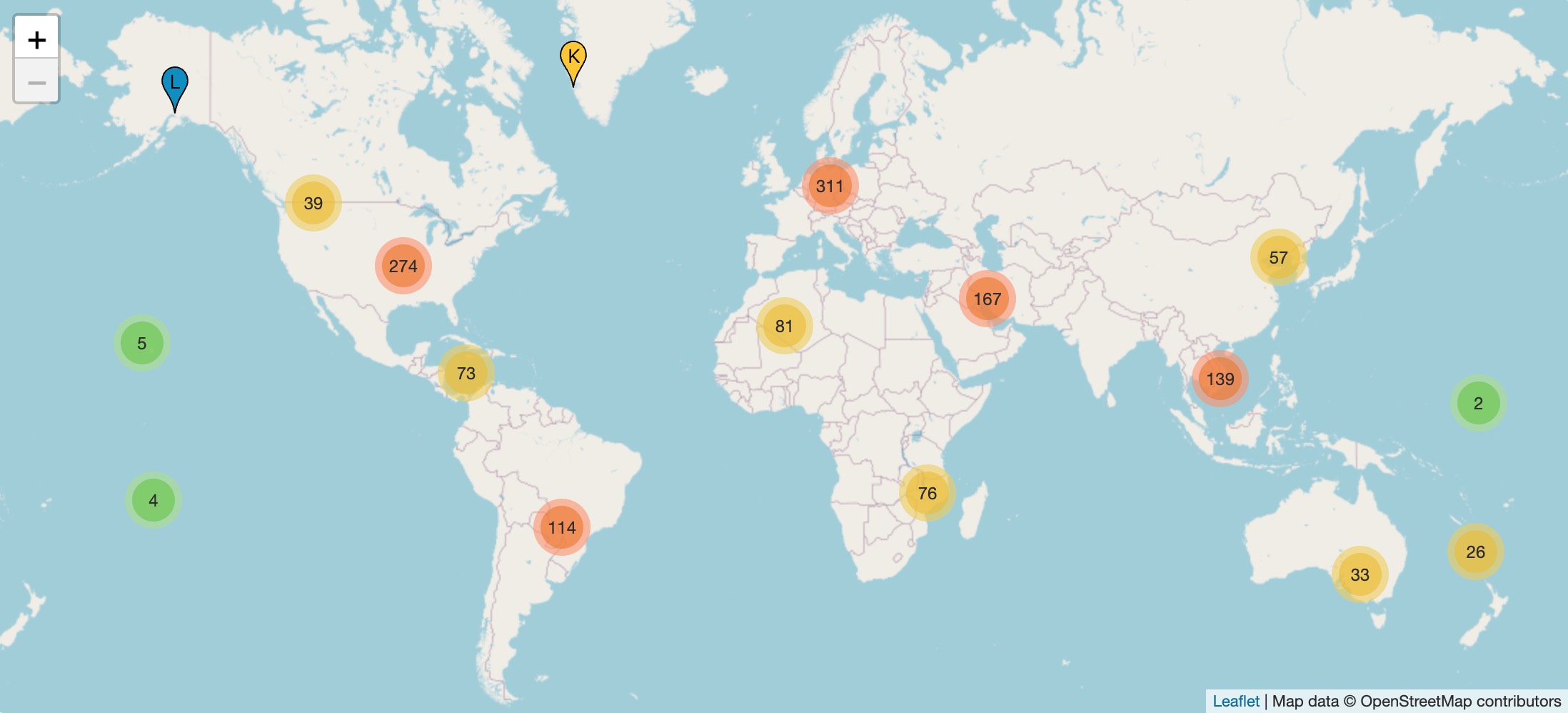
The distribution of these root servers is available on root-servers.org. Requests to the root DNS from within China are actually handled by local root server mirrors, as explained later.
Question: With so many nodes sharing one of the 13 IP addresses, won’t there be a conflict?
2.2 Who operates Root DNS Servers
2.2.1 ICANN
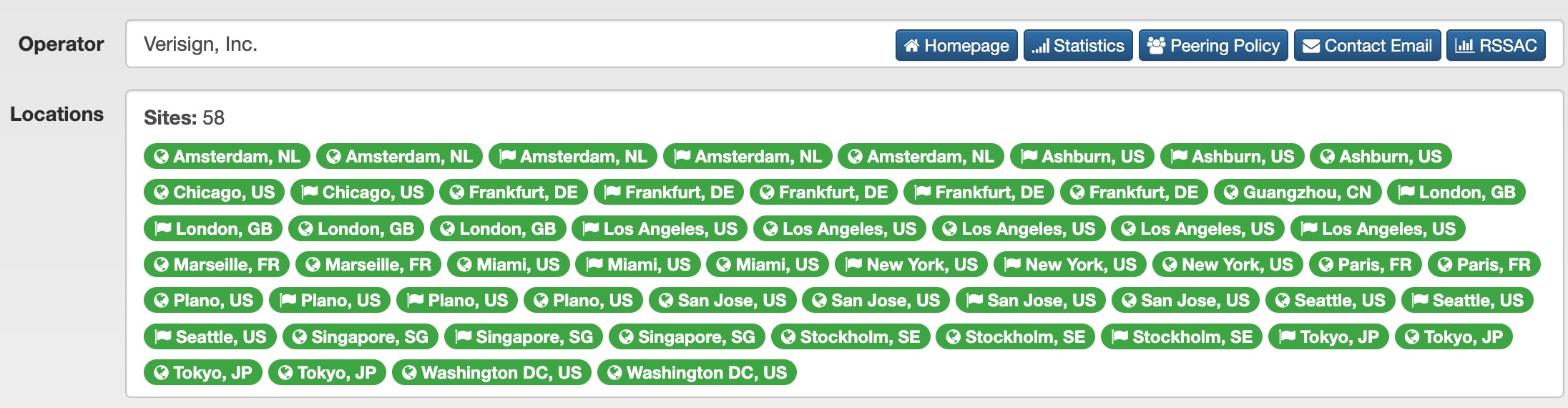
These 13 root domain name servers are independently operated by 12 organizations. Root A is the taproot and is managed by the American company Verisign. In order to ensure the availability of the root domain name server, each company will deploy multiple nodes. For example, Root A alone has deployed 58 root domain name servers (February 15, 2023).
The most important file in the root DNS, the root zone file, is managed by ICANN.
ICANN (The Internet Corporation for Assigned Names and Numbers) is a non-profit organization registered in the United States founded in 1998.
2.2.2 DNS Management History
The historical change process of root DNS management is still relatively complicated. Here is a brief introduction. If you are not interested, you can jump directly to the next chapter.
The original technical developer and manager of DNS was Dr. Jon Postel of the University of Southern California. He was in charge of the management and distribution of root DNS in the early days of the Internet.
In 1988, the U.S. government asked Jon Postel to take safer and more reasonable measures to ensure the distribution and management of the Internet's core resources. As a result, the famous IANA (The Internet Assigned Numbers Authority, Internet Numbers Assignment Agency) was established and managed under a contract between DARPA and the University of Southern California Information Science Institute (ISI).
IANA is responsible for the management and coordination of global Internet numbers and encodings. The reason why such an organization is needed is because the values or parameters of Internet protocols must be globally unique, otherwise they cannot be interconnected. For example, the HTTP protocol waits for user requests on port 80 by default, and the 404 encoding consistently represents "page not found." IANA's main responsibilities include the allocation of IP address segments, allocation of protocol codes and numbers (such as protocol numbers, port numbers), autonomous system number (ASN) allocation, DNS root zone management (including generic top-level domain name gTLD and country and regional top-level domain name ccTLD management), etc.
After the establishment of ICANN in 1998, the U.S. Department of Commerce entrusted ICANN with the responsibility for the daily operations of IANA in the form of a contract, and IANA was transferred from ISI to ICANN.
For the management of top-level domain names, ICANN's policy is that each top-level domain name (such as com, cn, org, there are currently more than 1, 000 top-level domain names) must find a hosting provider, and all matters related to the domain name will be responsible for the hosting provider.
- .cn domain name is the China Internet Network Information Center (CNNIC), which determines various policies for the .cn domain name.
- .com, .net, .name, and .gov are all hosted by Verisign.
History: Verisign and ICANN have had several unpleasant disputes
In 2003, Verisign launched a new service, Site Finder. Users who visit unregistered .com or .net domain names will be directed to Verisign's website. This means that it actually owns all unregistered .com and .net domain names. Within a few days, Verisign ranked among the top 10 websites in the world.
ICANN requires Verisign to cease the business immediately, otherwise it will terminate the domain name hosting contract. Verisign gave in and stopped the business, but then took ICANN to court, asking the court to clarify the contract between the two and whether ICANN had the power to interfere with its business.At the end of 2006, they reached an out-of-court settlement. ICANN agreed to extend Verisign's top-level domain hosting contract and agreed to raise the cap on the registration fee Verisign can charge consumers for a single domain name from $6 to $7.85. This fee standard is still used today. When you register a .com or .net domain name, the $0.18 you pay is the management fee charged by ICANN, the $7.85 is the hosting fee charged by Verisign, and the rest is the domain name retailer's fee.
Although ICANN operates IANA, it is under the contract management of the US government after all. Countries around the world and private individuals have criticized it and unanimously believe that the US government should withdraw completely.
On March 14, 2014, the U.S. Department of Commerce’s National Communications and Information Administration (NTIA) announced its willingness to completely transfer the management of IANA to ICANN and requested ICANN to formulate a transfer plan. NTIA particularly emphasized that the transfer plan should strengthen the multi-stakeholder model and cannot replace the current role of NTIA with intergovernmental organizations or government-led organizations.
On March 17, 2016, ICANN submitted a transition plan to NTIA. On June 9, 2016, NTIA announced its review opinions, stating that the transition plan submitted by ICANN met the previously set conditions.
On August 16, 2016, NTIA announced that it would no longer extend the existing contract.
Although there were some obstacles, in the end, on October 1, 2016, the contract between ICANN and the U.S. Department of Commerce regarding the IANA functions expired and was not renewed, and ICANN became an independent non-profit organization. IANA department staff and other related resources have been transferred to ICANN's newly established subsidiary PTI (Public Technical Identifiers, Public Technical Identifiers).
ICANN is managed using the global multistakeholder governance model. There are 5 seats on the PTI board of directors, 3 seats are appointed by ICANN and 2 seats are elected by the nomination committee composed of representatives from the global Internet community. In February 2017, ICANN issued a PTI director election announcement. After multiple rounds of interviews and background checks for half a year, the Nomination Committee announced on October 26, 2017 that Wang Wei of my country's Beilong China Network and another European representative were selected. After another month and a half of conflict of interest review, the ICANN Board of Directors officially confirmed Wang Wei’s election on December 13, 2017.
On the surface, ICANN allowed Verisign to reap huge monopoly profits. (A company once proposed that as long as it hosts the .com domain name, the hosting fee for a single domain name can be reduced to $1 per year.) But in fact, ICANN is exerting market power in another way, that is, it continues to increase the number and variety of top-level domain names. If you think the .com domain name is too expensive, you can apply for other top-level domain names. There are more than 1, 000 top-level domain names for you to choose from.
3. TLD server and authoritative DNS server
Root DNS servers provide the names and IP addresses of TLD servers. Resolution then continues through the DNS hierarchy until the final IP address for the domain is found.
3.1 TLD server
In the DNS hierarchy, Top-level Domain (TLD) represents the first stop after the root zone. Simply put, a TLD is everything after the last dot of a domain name. For example, in the domain name google.com, .com is the TLD. Some other popular TLDs include .org, .uk, and .edu, among others.
Divided by type, it is divided into:
Public top-level domain
Top-level domains that can be registered by any identity can be divided into various uses, including generic top-level domains (.com, etc.), country and regional top-level domains (.cn, etc.), test top-level domains (. Chinese characters, etc.), temporary top-level domains, and infrastructure top-level domains.Semi-public top-level domain
Top-level domains that can only be registered by specific identities, and their uses will be restricted, such as .bank and .finance that can only be registered by related industries.Undisclosed top-level domain
Top-level domains that are reserved and not open for registration, used for organizations or brands, such as .canon, .google.
Among them, the general top-level domain is managed by ICANN; the national and regional top-level domain is managed by the government of the geographical location, such as China's CNNIC management.cn.
TLD Server plays an important role in the DNS lookup process. For all uncached requests, when a user enters a domain name such as google.com into a browser window, the DNS resolver begins the search by communicating with the TLD server. In this case, the TLD is .com, so the resolver will contact the TLD Server and then provide the resolver with the IP address of the Google origin server.
3.2 Authoritative DNS server
The level below a TLD server is an authoritative DNS server. Authoritative DNS infrastructure is operated by DNS hosting providers (such as DNS.com at ns1.dns.com and ns2.dns.com); it provides domain-management services and maintains DNS records.
If you query google.com, the authoritative DNS server can provide the DNS resolver with the IP address of the server found in the DNS A record, or if the domain has a CNAME record (alias), it will provide the DNS resolver with an alias domain, in which case the DNS resolver will have to perform a completely new DNS lookup to obtain the record (usually the containing A record for the IP address).
For information about what is an A record and what is a CNAME record, please read Chapter 4.1 of this article.
3.3 DNS resolver
The DNS resolver has been mentioned many times before. In fact, it does not exist in Standard DNS level. Its birth mainly provides data caching to improve DNS query performance.
A DNS resolver (also called a recursive resolver) is the first stop in a DNS query. DNS resolvers act as middlemen between clients and DNS name servers. After receiving a DNS query from a web client, the DNS resolver will respond with cached data, or it will send a request to the root name server, followed by another request to the TLD name server, and then a final request to the authoritative name server. After receiving a response from an authoritative name server that contains the requested IP address, the DNS resolver sends a response to the client.
DNS resolver Most of them are on the ISP operator side (such as telecommunications), responsible for the DNS query of the network access terminal, that is, the DNS server IP configured on the network access device.
4. DNS query
4.1 DNS record
4.1.1 What is a DNS record
DNS records (aka zone files) are directives located in authoritative DNS servers that provide information about a domain, including which IP addresses are associated with the domain and how requests to the domain are handled. These records consist of a series of text files written in what is called DNS syntax. DNS syntax is a string of characters used as commands that tell the DNS server what to do. Additionally, all DNS records have a “TTL,” which stands for Time to Live and indicates how often the DNS server refreshes the record.
You can think of a set of DNS records as a set of corporate business information, where each DNS record is equivalent to a company. DNS records provide a lot of useful information about the company, such as the company's location, business hours, services provided, etc. All domain names must have at least some basic DNS records to enable users to use the domain name to access their websites, as well as some optional records for other purposes.
4.1.2 Common DNS record types
- A record - A record that holds the IP address of the domain.
- AAAA record - A record containing the domain's IPv6 address (as opposed to an A record, which lists IPv4 addresses).
- CNAME record - Forwards one domain or subdomain to another domain, without providing an IP address.
- MX record - Directs mail to the email server.
- TXT record - Allows administrators to store text comments in records. These records are often used for email security.
- NS record - Name server where DNS entries are stored.
- SOA record - Storage domain management information.
- SRV Record - Specifies the port used for a specific service.
- PTR record - Provides domain name in reverse lookup.
Just remember the A record and CNAME record. There are more related DNS records. If you are interested, please read "DNS record type list".
4.2 3 DNS query types
After introducing various DNS servers and data types, let’s analyze the query operation. There are three query methods for DNS:
- Recursive query
- Iterative query
- Non-recursive query
4.2.1 Recursive query
Recursive queries generally occur when the client requests the DNS server. The client issues a domain name resolution request, and the DNS server must return the corresponding IP address or return an error not found.
4.2.2 Iterative query
Iterative queries generally occur between DNS servers. When the client issues a domain name resolution request, the DNS server needs to give the best answer. This best answer may be the "nearest" TLD server or an authoritative domain name server. In any case, the client needs to make another request for the returned result until the final result is obtained.
4.2.3 Non-recursive query
Non-recursive query occurs between the client and the DNS server, which means that the requested DNS server already knows the answer and returns it directly. There may be two situations here. One is that the DNS server caches the corresponding IP locally, or it is an authoritative server that caches the corresponding domain name. In the second case, you only need to send another request to get the result back.
4.3 8-Step query
Next, let’s understand the 8-step DNS query from a simple example, namely: Enter smallfan.top in the browser URL bar. How to find the corresponding server IP?.
1 |
|
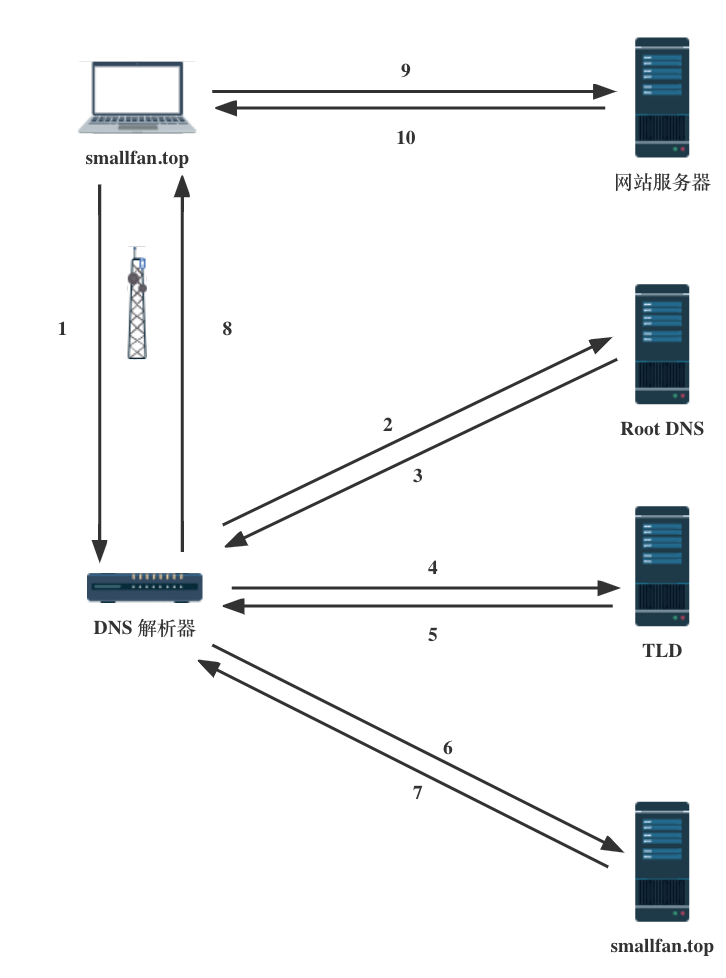
The process of DNS domain name resolution is quite interesting. The whole process is similar to the process of finding someone to ask for directions in our daily life. It only gives directions but does not lead the way.
Question: Do you have to go through so many steps every time you resolve a domain name?
The answer is no. DNS uses cache as much as possible in each query node.
4.4 DNS Caching
The purpose of caching is to temporarily store data in a location, thereby improving the performance and reliability of data requests. DNS Caching involves storing data closer to the requesting client so that DNS queries can be resolved earlier and additional queries further down the DNS lookup chain can be avoided, thus improving load times and reducing bandwidth/CPU consumption. DNS data can be cached in a variety of different locations, each of which stores DNS records for a period of time determined by a time-to-live (TTL).
4.4.1 Browser DNS cache
Modern web browsers are designed to cache DNS records for a certain period of time by default. The purpose is obvious; the closer the web browser is to DNS caching, the fewer processing steps must be taken to check the cache and make the correct request to the IP address. When a request for a DNS record is made, the browser cache is the first location checked for the requested record.
In Chrome, you can go to chrome://net-internals/#dns to view the status of your DNS cache.
4.4.2 OS-level DNS cache
OS-level DNS resolver is the second and last local stop for DNS queries before they leave the client computer. The process within the operating system designed to handle this query is often called a "stub resolver" or DNS client. When the stub resolver gets a request from an application, it first checks its cache to see if there is such a record. If not, search in Host file of this machine. If there is one, terminate the query and use the IP in the file directly; if not, send the DNS query outside the local network (with the recursive flag set) to the DNS Resolver inside the Internet Service Provider (ISP).
4.4.3 Router DNS Cache
Most of the current home WIFI signal routers provide DNS caching function. In this case, the local router's DNS cache data will be used directly if it has one.
4.4.4 DNS Resolver Cache
The DNS Resolver provided by the ISP also has a caching function.
5. root server mirrors
5.1 The role of root server mirrors
Root server mirrors assume the same functions as root. The most important file in the root DNS is the Root Zone file. All top-level domain name records are stored in the root zone file.
Secondary root servers synchronize from the primary root, while root server mirrors synchronize from a root server. All of them ultimately serve the same root zone file. Notably, a root server mirror advertises the same IP address as its corresponding root server.
There are more than a thousand root server mirrors around the world, but most people don’t know that they share 13 IPs together! There is a question at the beginning of this article that is related to it. Since there are only 13 roots, how is this done? The answer is Anycast (Anycast, also translated as Anycast) technology.
Anycast refers to using an IP address to identify a group of hosts that provide specific services on the IP network. The service visitor does not care which host provides the service. The packet accessing the address can be routed by the IP network to the "nearest" server (preferably just one, do not send to multiple) servers. Here "nearest" can refer to characteristic values such as router hop count, server load, server throughput, round trip time (RTT, round trip time) between client and server, available bandwidth of the link, etc.
On the one hand, users can access it nearby; on the other hand, it will be fine even if some roots fail. This is similar to the idea of load balancing + CDN. For Chinese users, root requests generally do not go to the United States, but are routed to root server mirrors in China through Anycast Technology.
5.2 Domestic root server mirrors situation
The distribution of all root servers is available on root-servers.org. Its root server mirror map showed the following counts on February 15, 2023: Beijing 8, Shanghai 2, Chongqing 1, Hangzhou 2, Wuhan 2, Zhengzhou 2, Xining 2, Guiyang 1, Nanning 1, Haikou 1, Guangzhou 3, Hong Kong 8, and Taipei 9.
Including Hong Kong, Macao and Taiwan, there are a total of 42 root server mirrors in my country. As mentioned earlier, all requests to the root DNS issued within my country are actually completed by mirroring.
5.3 Development History of Domestic root server mirrors
From the information I have found so far, my country has been continuously introducing root server mirrors since 2003, with the main purpose of ensuring High availability and High efficiency of domain name resolution services.
- In 2003, China Telecom introduced the first root server mirrors node (F root) in China.
- In 2005, the I root server operating organization established China's second root server mirrors (I root) at CNNIC.
- In 2006, China Unicom (formerly China Netcom) cooperated with the American company VeriSign to officially open the J-root server mirror in China, and also introduced the world's two largest top-level domain name ".COM" and ".NET" mirror nodes; the main purpose of introducing these mirrors is to improve the resolution performance of the root domain name and top-level domain name.
- In 2014, 21Vianet cooperated with ICANN to add L-root domain name server mirrors in China.
- On June 24, 2019, the Ministry of Industry and Information Technology approved CNNIC to set up six domain name root server mirrors (F, I, K, L). The six domain name root servers are numbered JX0001F, JX0002F, JX0003I, JX0004K, JX0005L and JX0006L_(12), and approved the establishment of L-root server mirror JX0007L by the Internet Domain Name System Beijing Engineering Research Center (ZDNS) (13)_.
- On November 6, 2019, the Ministry of Industry and Information Technology approved the establishment of L-root server mirrors by China Academy of Information and Communications Technology, with numbers JX0008L and JX0009L respectively.
- On December 5, 2019, the Ministry of Industry and Information Technology approved the China Academy of Information and Communications Technology to establish a domain name root server (K-root server mirror), numbered JX0010K.
- On December 9, 2019, the Ministry of Industry and Information Technology approved CNNIC to establish domain name root servers (J, K-root server mirrors), with numbers JX0011J and JX0012K respectively.
- …
The Ministry of Industry and Information Technology wrote in the approval document to CNNIC: "Your center should strictly abide by the "Internet Domain Name Management Measures" and "Communications Network" Security Protection Management Measures" and relevant laws, regulations, administrative regulations and industry management regulations, accept the management and supervision and inspection of our ministry, establish an information management system that meets the requirements of our ministry and interface with the management system designated by our ministry, ensure the safe and reliable operation of the domain name root server, provide users with safe and convenient domain name services, ensure service quality, protect the security of users' personal information, and safeguard national interests and user rights."
5.4 What will happen if the United States causes trouble?
If you can seriously see the students here, I would like to give you a thumbs up for your intellectual curiosity.
From the previous introduction to Root DNS Servers, most Root DNS Servers are in the hands of ICANN or Verisign in the United States. Looking at the past actions of Tesla, Google and other companies, although ICANN is an independent non-profit organization, if the US government uses coercive power, the content of the A root (tap root) may still be tampered with.
That is, the root zone files can be tampered with. How would it be tampered with?
Let’s first take a look at what the root zone files look like.
You can download Root zone file from the ICANN official website.
You can see that there are dozens of lines of records related to cn domain name resolution.
1 | cn. 172800 IN NS a.dns.cn. |
If you delete the lines related to cn, it will be synchronized to all roots soon. Then, after all caches expire, no one in the world can access the website with the .cn suffix.
Is this true?
Because China operates local root server mirrors, it controls the data served by those mirrors, and domestic root queries are routed to them by local network operators. Therefore, the mirrors could decline to synchronize a change that removes .cn, preserving domestic access to .cn sites.
Of course, root and root server mirrors around the world that are not under our management will still synchronize these deletions if no action is taken. Then, except for China itself, no one from other countries can access the .cn website. However, these countries will respond soon. Any country that wants to access the .cn website will add the cn record back and refuse to synchronize the lines deleted by the United States. In the end, only a small number of countries cannot access the .cn website.
Based on the above analysis, the possibility of such trouble is extremely low. Firstly, this move will directly cause ICANN to lose credibility, and the entire Internet world will elect new institutions and new main roots; secondly, it will also directly shake the world pattern of network territory and network sovereignty, destroy the existing World Wide Web ecology, and bring direct disaster to Internet-related industries.
5.5 What happens if terrorists cause trouble?
The United States will not do this. So back to the title, what if terrorists insist on causing damage, such as directly blowing up 13 root DNS servers?
It was known when the Root DNS Servers were distributed earlier, Currently, there are more than 1, 000 root DNS service instances around the world., and these servers actually store the same data, which means that even if several servers are physically destroyed, new servers can be quickly deployed through mirror replication.
So what if we can really blow up all the Root DNS Servers in the world at the same time and space? As mentioned earlier in this article: root DNS server information is stored in all DNS servers on the Internet. At this time, TLD Server in various places will take on the important task of rebuilding and restoring the root server.
So what if TLD Server is exploded again? First of all, let’s ignore the feasibility of the number of TLD Server in the world. Even if there are no TLD, there are still authoritative DNS servers. Root DNS Server information They are everywhere like cells and cannot be completely eliminated.
So, now we can return to the answer to the title: There are thousands of existing Root DNS Servers around the world, and root DNS server information is stored in all DNS servers on the Internet, so even if the Root DNS Servers are blown up, even if the World Wide Web has a short-lived partial regional service failure, it can be quickly restored through mirroring.
6. Postscript
At the end of the conversation, there are two DNS-related international events that can be discussed again.
The "People's Daily" on June 24, 2014 quoted an expert as saying: "Currently, the United States controls 10 of the 13 domain name root servers on the global Internet. Theoretically, as long as the country's domain name is blocked on the root server, the country's national top-level domain name website can instantly 'disappear' from the Internet." In this sense, the United States has the unique power to control the Internet in the world and has the ability to deter other countries’ cyber borders and cyber sovereignty. For example, during the Iraq War, under the instruction of the US government, the application and resolution of the Iraqi top-level domain name ".iq" was terminated, and all websites with the ".iq" suffix evaporated from the Internet.
An article in the 2014 issue 10 of the magazine "Information Security and Communications Confidentiality" wrote: "In 2004, due to a dispute with Libya over the management of top-level domain names, the United States terminated the resolution service of Libya's top-level domain name .LY, causing Libya to disappear from the Internet for three days."
At first glance, it sounds like the United States is really causing trouble! What actually happened:
Regarding the Iraqi domain name incident, in 2017 Professor Duan Haixin of Tsinghua University published a related article "The reasons behind the deletion of the Iraqi domain name .IQ by the United States and the early root domain management", which clearly explained the ins and outs of the entire incident. The main reason is that the previous administrator of the .iq domain name was imprisoned in 2002, and the new administrator (NCMC) only applied for it in 2005. At that time, IANA was also considering seeking unanimous approval of the new authorization from both the old and new agents, so the so-called "application and resolution work was terminated."
Regarding the Libyan domain name incident, "The Libyan top-level domain name (.LY) suspension of service" clarifies that the fact is that the two organizations involved in operating .LY were the result of infighting over ownership rights (one of them shut down the resolution of the .LY domain name server). After this incident, in October 2004, ICANN approved the award of .LY to the Libyan Post and Telecommunications Corporation, and the .LY incident was finally settled.
In regard to DNS-related risks, industry experts have also expressed some opinions:
Wu Jianping, academician of the Chinese Academy of Engineering and director of the Department of Computer Science at Tsinghua University, said in an interview in 2019 that the DNS root domain name server is not the "Core Button" of the Internet. It is impossible for global Internet root domain name server operators to shut down all root servers, including shadow servers, at the same time.
Mao Wei, director of the Beijing Engineering Research Center for the Internet Domain Name System (ZDNS), said that experts continually improve the security of the DNS root system. Even if access to the root were disrupted, contingency measures would remain available. Within China, operators could use root-zone backups and emergency root servers; globally, options include root server mirrors, more root server instances over IPv6, and alternative root server operator mechanisms.
So, there is no need to worry about the root domain name service being paralyzed. If there is, it must be the Trisolarans who have arrived on the earth. 👽👽
References
- Ruan Yifeng’s web log-Knowledge of root domain names
- DNS classification and difference-authoritative DNS, recursive DNS, forwarding DNS
- If the United States blocks the root domain name server, will China disappear from the Internet?
- cloudflare-DNS record
Supplement 1: DNS Poisoning
E1.1 Reason
DNS queries commonly use UDP at the transport layer, which does not authenticate the source of a response. A resolver typically accepts the first response it receives and discards later ones. An attacker who can observe and analyze UDP query datagrams on port 53 can therefore race the legitimate server with a forged response, causing DNS poisoning.
The end user will visit a wrong website. DNS Poisoning is often applied to The secret that cannot be told.
How to get ahead?
DNS Poisoning is mainly achieved by tampering with the cached content on the DNS Resolver. The unreliability of the DNS protocol itself makes it vulnerable to attacks. When a contaminated DNS server receives a domain name resolution request, it returns a tampered IP address instead of the real IP address of the server. As a result, the client cannot establish a connection with the real server. A simple understanding is that when the computer sends a "domain name query" request to the domain name server, and then the domain name server sends the "DNS response" to your computer, there is a time difference between them. If an attacker forges a wrong "DNS response" and sends it to your computer before the "DNS response" from the domain name server reaches your computer. Then your computer gets a wrong IP address. This is the process of DNS Poisoning.
E1.2 Pollution Control
E1.2.1 Modify the Host file
This method is not omnipotent. Generally, entries in the Hosts file cannot use wildcards (such as *.smallfan.top), and Super Powerful DNS Poisoning King’s DNS Poisoning performs partial matching rather than exact matching on domain names, so the Hosts file also has certain limitations, and you will still encounter a lot of trouble when trying to access such domain names.
E1.2.2 🪜
It is inconvenient to elaborate.
Supplement 2: DNS Hijacking
E2.1 Principle
DNS Hijacking means that the DNS system has been invaded or certain records, such as A records, have been artificially modified. In professional terms, it is to obtain control of the resolution records of a certain domain name through certain means, and then modify the resolution results of the domain name, causing access to the domain name to be transferred from the original IP address to the modified designated IP. The result is that the specific URL cannot be accessed or the access is a fake URL.
There are three common methods:
E2.1.1 Using DNS server to carry out DDoS attack
The normal DNS server recursive query process may be exploited into a DDoS attack. Assume that the attacker knows the IP address of the attacked machine, and then uses this address as the source address to send the parsing command. In this way, when the DNS server is used to recursively query, the DNS server responds to the original user, and this user is the attacker. So if the attacker controls enough compromised hosts and repeatedly performs the above operations, the attacker will be subject to a DDoS attack with response information from the DNS server.
E2.1.2 DNS Cache Poisoning
This method is the same as DNS Poisoning. The attacker uses DNS requests to put data into the cache of a vulnerable DNS server. This cached information will be returned to the user when the customer performs DNS access, thereby guiding the user's access to the normal domain name to the malware distribution, phishing and other pages set by the intruder, or obtaining the user password information through forged emails and other server services, causing the customer to suffer further infringement.
E2.1.3 DNS information hijacking
In principle, the TCP/IP system uses serial numbers and other methods to avoid the insertion of counterfeit data. However, if an intruder monitors the conversation between the client and the DNS server, he or she can guess the DNS query ID that the server responds to the client. The attacker hands fake responses to the user before the DNS server, thereby tricking the client into visiting a malicious website. Suppose that when a domain name resolution request packet submitted to a domain name server is intercepted, a false IP address is returned to the requester as a response message according to the interceptor's intention. At this time, the original requester will use this false IP address as the domain name it wants to request and connect. Obviously, it has been deceived and cannot connect to the domain name it wants to connect to.
E2.2 Countermeasures
Use a free public DNS resolver outside the affected network, such as OpenDNS (208.67.222.222) or Google Public DNS (8.8.8.8).