1. Widget
1.1 canUpdate method
canUpdate(...) is a static method used primarily to reuse existing widgets when the widget tree is rebuilt.
- The basic function: whether to use the new widget object to update the configuration of the corresponding
Elementobject in the old UI tree. - Judgment rule: As long as
newWidgetandoldWidget’sruntimeTypeandkeyare equal at the same time,new widgetupdates the configuration of theElementobject, otherwise a newElementwill be created.
1.2 Four trees in Flutter
1.2.1 Basic Contacts and Responsibilities
- Generates an Element tree based on the Widget tree. The nodes in the Element tree all inherit from the
Elementclass. - Generates a Render tree (rendering tree) based on the Element tree. The nodes in the rendering tree all inherit from the
RenderObjectclass. - Generates a Layer tree based on the rendering tree, and then displays it on the screen. The nodes in the Layer tree all inherit from the
Layerclass.
- Layout and rendering logic is in the
Rendertree. Elementis the glue between Widget and RenderObject.
1.2.2 Example
1 | Container( // A container widget |
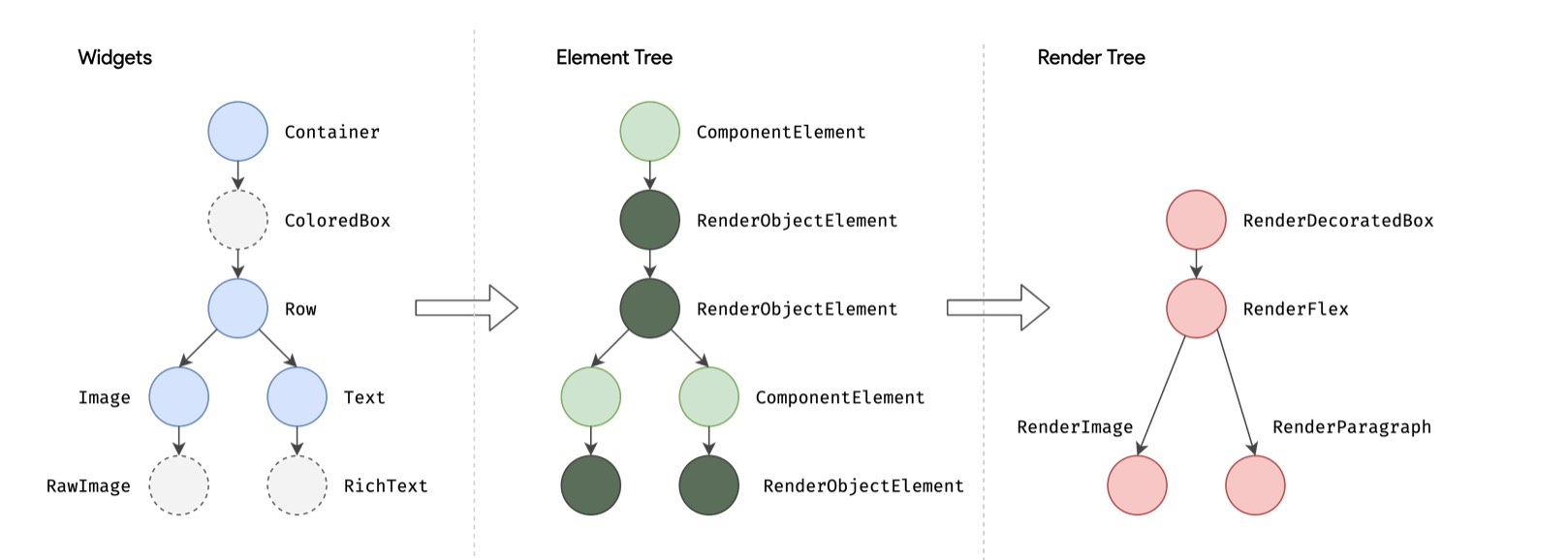
Note that if the Container sets a background color, a new ColoredBox will be created inside the Container to fill the background. The relevant logic is as follows:
1 | if (color != null) |
- Image internally uses RawImage to render images
- Text will render text internally through RichText
1.2.3 The relationship between four trees
- Widget and Element have a one-to-one correspondence.
- Widget does not correspond to RenderObject one-to-one. For example,
StatelessWidgetandStatefulWidgethave no corresponding RenderObject. - The rendering tree will generate a Layer tree before being displayed on the screen.
1.3 Widget constructor
According to convention, the widget's constructor parameters should use named parameters, and the required keyword should be added to the parameters that must be passed in the named parameters. This is beneficial to the static code analyzer for inspection; when inheriting a widget, the first parameter should usually be Key. In addition, if the widget needs to receive child widgets, the child or children parameters should usually be placed at the end of the parameter list. Also according to convention, widget properties should be declared as final as much as possible to prevent accidental changes.
1 | class Echo extends StatelessWidget { |
2. StatelessWidget
2.1 Basic concepts
StatelessWidget inherits from the widget class and overrides the createElement() method:
1 |
|
StatelessElement indirectly inherits from the Element class.
- Function:
StatelessWidgetis used in scenarios that do not need to maintain state. It usually builds the UI by nesting other widgets in thebuildmethod. During the construction process, its nested widgets will be built recursively.
2.2 Context
The build method takes a context parameter, an instance of BuildContext that represents the current widget's position in the widget tree. Each widget has a corresponding context object because every widget is a node in that tree.
3. StatefulWidget
3.1 Basic concepts
Like StatelessWidget, StatefulWidget extends the Widget class and overrides createElement(). It returns a different type of Element and introduces a new method, createState().
1 | abstract class StatefulWidget extends Widget { |
StatefulElement may call createState() multiple times to create a state object.
Timing of multiple calls:
- When a StatefulWidget is inserted into multiple locations in the widget tree at the same time, the Flutter framework will call this method to generate an independent State instance for each location. In fact, it is essentially a StatefulElement corresponding to a State instance.
3.2 Relationship between the three
- When a StatefulWidget is inserted into multiple locations in the widget tree at the same time, an independent State instance is generated for each location.
- State object and the
StatefulElement. - State When the state of the object changes, a new widget instance may be rebuilt.
3.3 State
State:
- Can be read synchronously when the widget is built.
- Can be changed during the widget life cycle. When the State is changed, its setState() method can be manually called to notify the Flutter framework that the state has changed. After receiving the message, the Flutter framework will call its build method again to rebuild the widget tree, thereby updating the UI.
3.3.1 Two attributes
widget, which represents the widget instance associated with this State instance and is dynamically set by the Flutter framework. Note that this association is not permanent, because during the application life cycle, the widget instance of a node on the UI tree may change when it is rebuilt, but the State instance will only be created the first time it is inserted into the tree. When rebuilt, if the widget is modified, the Flutter framework will dynamically set State.widget to the new widget instance.context. The BuildContext corresponding to StatefulWidget has the same function as the BuildContext of StatelessWidget.
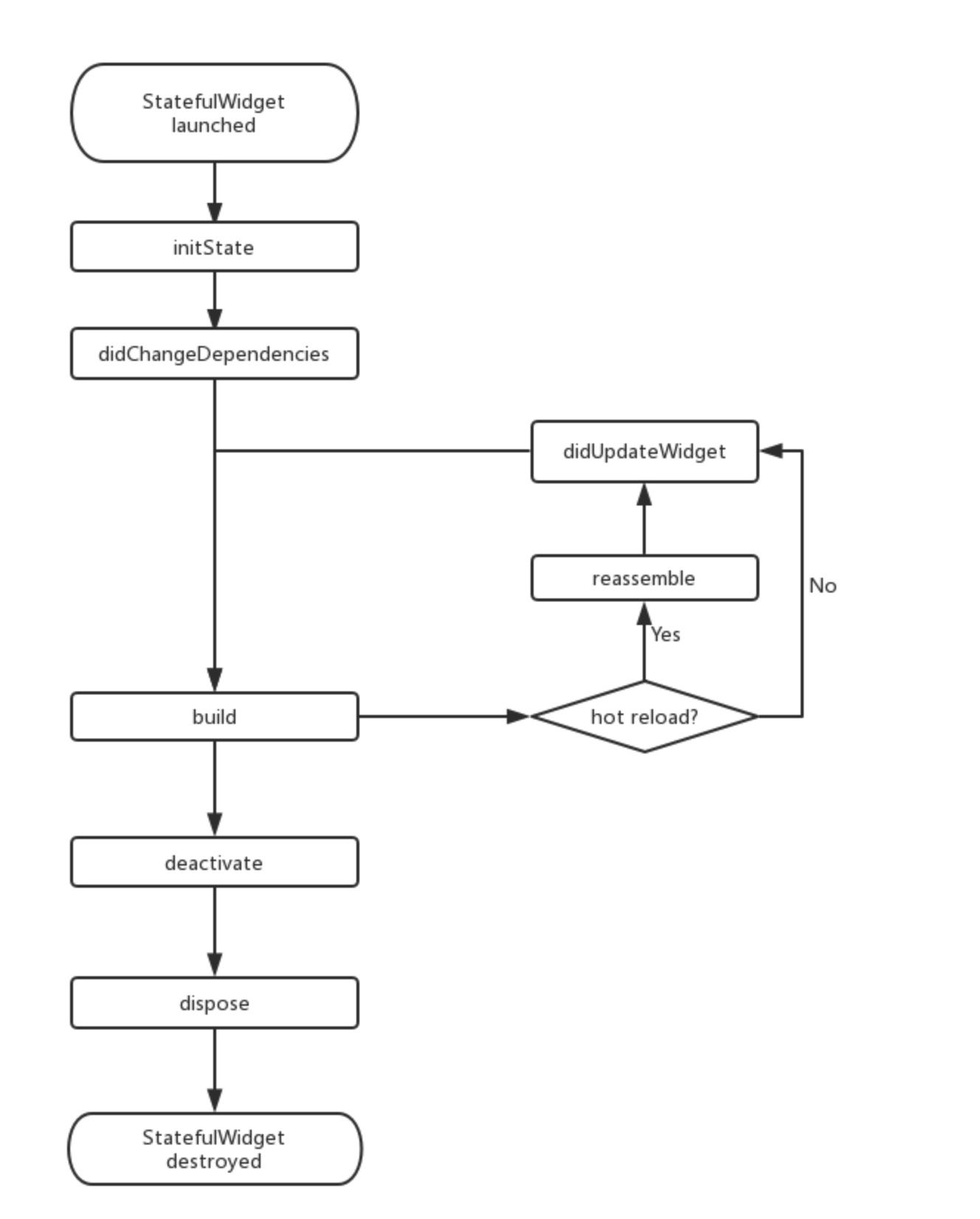
3.3.2 Life cycle
When created:
1 | I/flutter ( 5436): initState |
When hot reloading:
1 | I/flutter ( 5436): reassemble |
Remove in widget tree, then hot reload:
1 | Widget build(BuildContext context) { |
1 | I/flutter ( 5436): reassemble |
3.3.3 initState
Calling timing: It will be called when the widget is inserted into the widget tree for the first time. For each State object, the Flutter framework will only call this callback once.
Function: Usually some one-time operations are performed in this callback, such as state initialization, subtree event notification subscription, etc.
3.3.4 didChangeDependencies
Calling timing:
- Will be called when the dependencies of the State object change.
- The corresponding didChangeDependencies will also be called when the component is mounted for the first time (including re-creation).
Function: When the system language Locale or application theme changes, the Flutter framework will notify the widget to call this callback.
3.3.5 Build
Calling timing:
- After calling initState().
- After calling didUpdateWidget().
- After calling setState().
- After calling didChangeDependencies().
- After the State object is removed from one location in the tree (deactivate will be called) and reinserted into another location in the tree.
Function: Mainly used to build widget subtrees.
3.3.6 didUpdateWidget
Calling timing: When the widget is rebuilt, the Flutter framework will call widget.canUpdate to detect the widget. The old and new nodes at the same position in the tree, and then decide whether they need to be updated. If widget.canUpdate returns true, this callback will be called.
Function: Save performance overhead.
3.3.7 Deactivate
Call time: When the State object is removed from the tree.
3.3.8 Dispose
Calling timing: When the State object is permanently removed from the tree; if the removed subtree is not re-inserted into the tree after deactivate is called, the dispose() method will be called immediately.
Role: Resources are usually released in this callback.
3.4 StatefulWidget life cycle diagram
3.5 @mustCallSuper
When overriding methods in a class that extends StatefulWidget, every superclass method annotated with @mustCallSuper must be called from the subclass implementation.
4. Get the State object in the widget tree
4.1 The first method: obtain through Context
1 | class GetStateObjectRoute extends StatefulWidget { |
4.2 Convention for Static of Methods
Generally speaking, if the state of StatefulWidget is private (should not be exposed to the outside), then we should not directly obtain its State object in our code; if the state of StatefulWidget is to be exposed (usually there are some component operation methods), we can directly obtain its State object. However, the method of obtaining the state of StatefulWidget through context.findAncestorStateOfType is universal. We cannot specify whether the state of StatefulWidget is private at the syntax level, so there is a default convention in Flutter development: If the state of StatefulWidget is to be exposed, an of static method should be provided in StatefulWidget to obtain its State object, and developers can obtain it directly through this method; if If State does not want to be exposed, it does not provide the of method. This convention can be found everywhere in the Flutter SDK. Therefore, the Scaffold in the above example also provides a of method, and we can actually call it directly:
1 | Builder(builder: (context) { |
1 | Builder(builder: (context) { |
4.3 The second method: through GlobalKey
4.3.1 Add GlobalKey to the target StatefulWidget
1 | // defines a globalKey. Since GlobalKey needs to maintain global uniqueness, we use static variable storage |
4.3.2 Obtain State object through GlobalKey
1 | _globalKey.currentState.openDrawer() |
GlobalKey is a mechanism provided by Flutter to reference elements throughout the App. If a widget is set with GlobalKey, then we can obtain the widget object through globalKey.currentWidget and globalKey.currentElement to obtain the element object corresponding to the widget. If the current widget If it is StatefulWidget, you can obtain the state object corresponding to the widget through globalKey.currentState.